TheCatSite.com › Forums › General Forums › The Cat Lounge › Questions and problems
New Posts  All Forums:Forum Nav:

Questions and problems - Page 3

post #61 of 230
Quote:
Originally Posted by jcat View Post

1366 x 768 pixels, which is as high as it goes. I could try lowering it, but now that I've managed to log in I'm afraid to log out again.

No need, just wanted the specs to investigate further - thanks!
post #62 of 230

So you have to log-in in order to even read threads? When I don't log-in, I can only read the first post of each thread. As soon as I do log-in, everything appears. Is that the way it's supposed to be?


The smilies are just a huge mash....everything is together. Is there any way to group them like they were before? With this many smilie icons, it's difficult to find what we're looking for.


And again, slow.....really slow. I got so frustrated that I started timing how long it took me to get to a new thread, for the screen to change, to log-in, to do anything. Evidently, the board is set so that it takes 18 seconds to do anything here. Think 18 seconds is fast? Time it. I'm serious. And while I sit here and wait, I can do nothing else....just twiddle my thumbs. I'll get to be a good thumb twiddler if nothing else.


I'm sorry to be so negative. I'm trying not to be.....honest. But this is simply way too slow.

post #63 of 230
I've reported the problem with only being able to read the first post to Anne. That seems to be the case only for the threads started today, at least for me.

I don't know what the problem is with the slowness - I'm not experiencing it. What browser are you using? Some aren't fully supported. Do you have the problem with other browsers? Have you logged out, cleared your browser cache, and logged back in?
post #64 of 230

Hi all zwaai.gif,


I am running Redhat Linux. Last night I had no preview "button" but I do now wave2.gif. Last night I also had no emotion icons, but I do now.


I can not manually, when using Firefox click the misspelled word smashfreak.gif I have to spell check the whole post as if it was a word document, is there a way around that?


Lastly, I have NO EDIT feature. Is that done on purpose? If so, I am NOT HAPPY!!


Edited by Cat Person - 11/2/11 at 11:52am
post #65 of 230
Quote:
Originally Posted by otto View Post


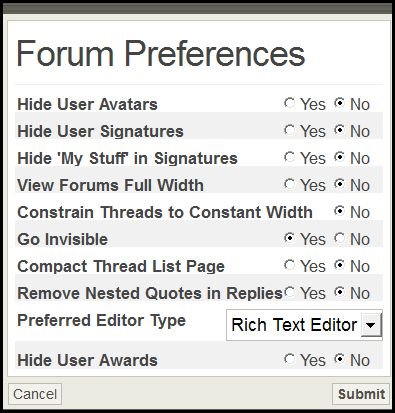
I have no YES option for this.  I, too, have trouble with this full page view, it hurts my eyes terribly. I found preferences okay, but there is no YES option under the constrain threads to Constant Width.


And my firefox spell check,  is not working in this forum. The missspelled word is highlighted but right clicking does not give me the correct spelling, it gives me nothing.


Quote:
Originally Posted by AbbysMom View Post


If you went to preference in your profile, you would click the box for yes. Right under this post there should be preference listed. If you click on that, it will pop up a box that gives you yes and no options.
AS far as the spelling, I was having the same problem and just figured it out. 26.gif. Chance your text from the rich editor to the BB editor and the FF spelling will work. smile.gif


Another option for accessing Firefox add-ons like the spell check.  In the Rich Text Editor, hold down the control key when you do your right mouse click.  This will bring up the Firefox sub-menu instead.

post #66 of 230
Quote:
Originally Posted by Cat Person View Post

Hi all zwaai.gif,


I am running Redhat Linux. Last night I had no preview "button" but I do now wave2.gif. Last night I also had no emotion icons, but I do now.


I can not manually, when using Firefox click the misspelled word smashfreak.gif I have to spell check the whole post as if it was a word document, is there a way around that?


Lastly, I have NO EDIT feature. Is that done on purpose? If so, I am NOT HAPPY!!


Hold the control key when you right mouse click and you will get the Firefox sub-menu as before.


What post are you trying to edit?  Recent posts can be edited but not older ones.


post #67 of 230
Quote:
Originally Posted by Anne View Post


It's very fast for me here. How are you doing with other websites? Maybe it's a problem with your internet connection?


Running much better today, so thats good!


post #68 of 230

Everything is very fast and going smoothly over here!

post #69 of 230


Quote:
Originally Posted by sillyitiliangrl View Post

Does the site seem to be running slow for anyone else?  Pages are loading very slow for me, I even tried re-starting.


Yes, very slow. 


post #70 of 230


Quote:
Originally Posted by sillyitiliangrl View Post

Does the site seem to be running slow for anyone else?  Pages are loading very slow for me, I even tried re-starting.


It's dreadfully slow for me too.......takes forever to load anything. Pages hang for some reason


post #71 of 230
Quote:
Originally Posted by Anne View Post

I'm so sorry the color scheme isn't comfortable for you frown.gif It's actually the default color scheme we used on the old platform, and the one an overwhelming majority of members are used to.
I'm afraid there's no built-in option in the forums to choose a different skin, however, if you're using Firefox, you may be able to use this solution -
  • Go to Tools > Options
  • Under the Content Tab, click where it says "colors"
  • Uncheck where it says "Allow sites to choose their own colors"
  • Set up the colors of your choices for background, fonts and links.
This will not create a very pretty design, but should allow you to get rid of any bothersome colors and create a simple palette of your own.
Hope this helps!

Actually, it is similar colors, but MUCH harsher (brighter?). The old forum default was almost a pastel - much softer. agree.gif
post #72 of 230
Is this an appropriate place to comment about smileys? There seem to be some missing? If we're constrained to the number in the box, can the site perhaps swap some?

clap.gif
biggrin.gif

Are the two that seem to be missing. I thought the old code wasn't working, but when I type agree.gif the picture comes up, so I assume the problem is that the smileys don't pop up when code is used are no longer an option?
post #73 of 230
Oh - they're here! They didn't show up in PMs
post #74 of 230
I have to say, the site is much faster for me now than on the old server. I will alert the tech people, but I suspect it's an ISP issue and not a problem with the site.
post #75 of 230
Font colors? I know we can't use them in signatures, but in the beta, we were able to use colors for fonts in posts. The color palette icon is there, but nothing happens when I click it (other than this): COLOR=FF00AA The palette doesn't show up, can't select a color. ????
post #76 of 230
Comment on the color scheme again, sorry! I noticed (that for me) the only "harsh" color is the red bar at the top of each post and each forum. INSIDE a specific forum, it's all the softer colors.

Maybe this was the missing smiley:

rolleyes.gif

And another question about navigation. On the old site, when clicking on a thread I already posted to, it would automatically take me to where I left off when I revisted the thread. This forum seems to take me to the first post of the thread each time, so I have to click through the pages to get to where I left off?
post #77 of 230
OK, let me go send some smileys via PM, because that's where I seemed to have the problem.
post #78 of 230
Quote:
Originally Posted by -_aj_- View Post

Well im viewing the site through my phone and won't be doing that very often as I still can't use the view new post button that works because the site can't open the drop down menus will there ever be a button that is just a button?


On the bottom left of the page above the red bar you will see:

View: New Posts | All Discussions


If you click New posts, it will work on your phone. smile.gif
post #79 of 230
Quote:
Originally Posted by -_aj_- View Post

Well im viewing the site through my phone and won't be doing that very often as I still can't use the view new post button that works because the site can't open the drop down menus will there ever be a button that is just a button?


Was wondering the same thing...  ????  Thanks :)ohwell.gif


post #80 of 230

THANKS!!!!wave2.gif

post #81 of 230

Didn't work for me (typing in the smiley code  :confused:)


Quote:
Originally Posted by LDG View Post

Oh - they're here! They didn't show up in PMs


post #82 of 230
SO ODD! Lauren, I'm not seeing smileys in your post here, I'm seeing the code!
post #83 of 230
Quote:
Originally Posted by otto View Post

Thanks I'll be watching. Because I just left and came back and there are new posts in this thread, but are not indicated in my subscription list. I had to start from the beginning of the thread.
Also: Is there a way to make the quoted post stand out better from the reply. You can barely tell what is quoted and what is the reply. Causes too much confusion and makes it too difficult to tell what's what.
Thanks to whoever mentioned the BBcode in reference to firefox spell check. I can't find your post again in this thread, but it worked.

OK, here is a list of my subscriptions see how the first one has the green arrow and the one below it does not?

338
post #84 of 230
Quote:
Originally Posted by LDG View Post

SO ODD! Lauren, I'm not seeing smileys in your post here, I'm seeing the code!

If you change to the BB editor, the codes will work. smile.gif
post #85 of 230
Quote:
Originally Posted by Cat Person View Post

Hi all zwaai.gif,

I am running Redhat Linux. Last night I had no preview "button" but I do now wave2.gif. Last night I also had no emotion icons, but I do now.
Yup, our tech team people have been hard at work, addressing bugs as fast as possible.

Quote:
Originally Posted by Cat Person View Post

I can not manually, when using Firefox click the misspelled word smashfreak.gif.  I have to spell check the whole post as if it was a word document, is there a way around that?

Lastly, I have NO EDIT feature. Is that done on purpose? If so, I am NOT HAPPY!!

Jana's solution works like magic - just hold down the CTRL key when you right click a misspelled word and voila - the FF box pops up.

Your editing privileges should be the same - are not seeing the edit button on old posts, new ones, or both?
post #86 of 230
But it's odd, because the codes are working (now) for me in the Rich text editor, and I can see the "slant" smiley as a smiley in Lauren's post, but not the "smile," for instance. I'll go switch. That means anyone typing in codes instead of clicking smileys from the menu would have to switch, right?

So Lauren, switch to BB editor! laughing02.gif
post #87 of 230

Not sure if its me or my work computer. Using Safari and I can't seem to get to the site. It keeps saying "Page not found", and when it does come up, I can't post anything!


I am also using Safari at home, and so far, no issues

post #88 of 230


How do I do that :confused:  You know me :dunce:.....  I will try to find it.

Quote:
Originally Posted by LDG View Post

But it's odd, because the codes are working (now) for me in the Rich text editor, and I can see the "slant" smiley as a smiley in Lauren's post, but not the "smile," for instance. I'll go switch. That means anyone typing in codes instead of clicking smileys from the menu would have to switch, right?
So Lauren, switch to BB editor! laughing02.gif


post #89 of 230
Quote:
Originally Posted by Feralvr View Post


How do I do that confused.gif  You know me dunce.gif.....  I will try to find it.


I figured it out biggthumpup.gif It was right there in front of me. doh3.gif Let's see if it works now agree.gif
post #90 of 230
Quote:
Originally Posted by LDG View Post

But it's odd, because the codes are working (now) for me in the Rich text editor, and I can see the "slant" smiley as a smiley in Lauren's post, but not the "smile," for instance. I'll go switch. That means anyone typing in codes instead of clicking smileys from the menu would have to switch, right?
So Lauren, switch to BB editor! laughing02.gif

THANKS, MY FRIEND heartpump.gifjumping.gif It works for me now hugs.gif
New Posts  All Forums:Forum Nav:
  Return Home
  Back to Forum: The Cat Lounge
TheCatSite.com › Forums › General Forums › The Cat Lounge › Questions and problems