
TheCatSite.com › Forums › General Forums › Cats and Other Animals › Anyone familiar with posting on YouTube?
New Posts  All Forums:Forum Nav:

Anyone familiar with posting on YouTube?

post #1 of 9
Thread Starter 
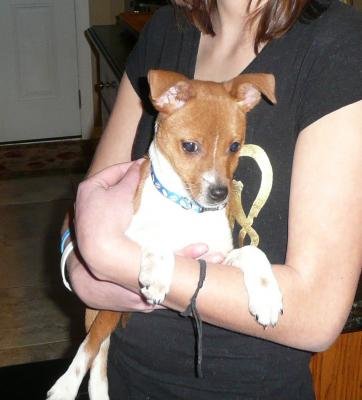
We recently rescued a small puppy (maybe three months old) who has deformed back legs. We think he's a Jack Russell/Basenji mix, although I just bought a DNA test to make sure.

I want to post some video of him to help us find him a home. He cannot bend his back legs and his hips are bent slightly inward. Apparently it happened in the womb. HE IS NOT HANDICAPPED - at least he doesn't know he is. I ran out of breath chasing this little guy around my living room and he propelled himself off and onto our couch a couple of times.

He's with a foster home now - she is certified in dealing with handicapped pets and he's running her ragged!

Any tips? I am not even sure how to get the video from my camera to my computer, so I need basic stuff. Thanks!
post #2 of 9
You just create a youtube account and upload the video content from a file on you pc, can't help with the camera to pc i'm afraid without knowing what model you have but i imagine you would have a USB lead to transfer over.

DNA profiling on a dog is very hit and miss you'd be better posting a picture here you'd probably get more accurate results
post #3 of 9
Just curious but do his legs look like this:

http://www.straightlegshepherds.org/.../hindlimb.html
post #4 of 9
Thread Starter 
Just curious but do his legs look like this:

http://www.straightlegshepherds.org/.../hindlimb.html


Thats' exactly what they look like. I saw that website yesterday and shared it with the foster mom. We're pretty much agreed that he doesn't need surgery and we are researching wheelchairs for him. Here's his picture:
LL
post #5 of 9
Thread Starter 
He's been crossing his back legs and "jumping" - its a stitch to watch him. Bless his heart; he's a sweet little bundle of energy.
post #6 of 9
I've never posted any videos on youtube so I can't help you. That dog is so cute! I hope he gets a good home very soon!
post #7 of 9
Hi, he is really a sweetheart!
The first thing you have to do, is to create an account on youtube.
Then, you need to transfer the video from your camera to your computer - you will do that the same way you transfer your pictures, either with an USB cable, or by plugging your SD Card (media card) into your computer. I am not sure how you personally transfer your pictures, but it will be the same way.
Once you do that, go to your youtube account - in there you will have the option to upload videos. Choose the video to upload from your computer. When it's uploading, make sure to put a description, and a catchy title/name, otherwise it will only show the name of the file witch is saved on the computer, and that doesn't really say anything... You will have options to make it public, private, etc...
It is really easy... not complicated at all...
Good luck with the little guy!
post #8 of 9
Thread Starter 
Thanks everyone. I will try to post tonite. He is such a curry _ he really deserves a good home.
post #9 of 9
Please post a link to the video when you upload it! I know the person who runs the Shepherd website I posted and I'd like to send her the link too.
New Posts  All Forums:Forum Nav:
  Return Home
  Back to Forum: Cats and Other Animals
TheCatSite.com › Forums › General Forums › Cats and Other Animals › Anyone familiar with posting on YouTube?